> ## Documentation Index
> Fetch the complete documentation index at: https://docs.parahelp.com/llms.txt
> Use this file to discover all available pages before exploring further.
# Improve
> Your product ships daily, and your agent keeps up.
Your product ships daily, and your agent keeps up. Automations watch GitHub, Linear, Slack, and your support queue (see [Automations](/platform/automations)) - when your product changes or a human handles a ticket, the Internal Agent reports the impact and proposes the update in a [task](/platform/tasks). Each proposal starts the next build, and the loop keeps turning.
## How it works
GitHub, Linear, Slack, and your support queue. See [Automations](/platform/automations).
It creates todos for the high-leverage improvements it identifies in automations and one-off tasks: knowledge gaps, tool ideas, and flow improvements. Each todo comes with the relevant context and attributes, assigned to the right user or team.
One click opens the task, and the next build begins. See [Build](/internal-agent/build).
Todos appear on the [Tasks page](/platform/tasks) and in your [Inbox](/platform/inbox).
## Reporting
Track your Customer Agent's performance in Parahelp or in your ticketing system's own reports.
Every ticket falls into one branch:
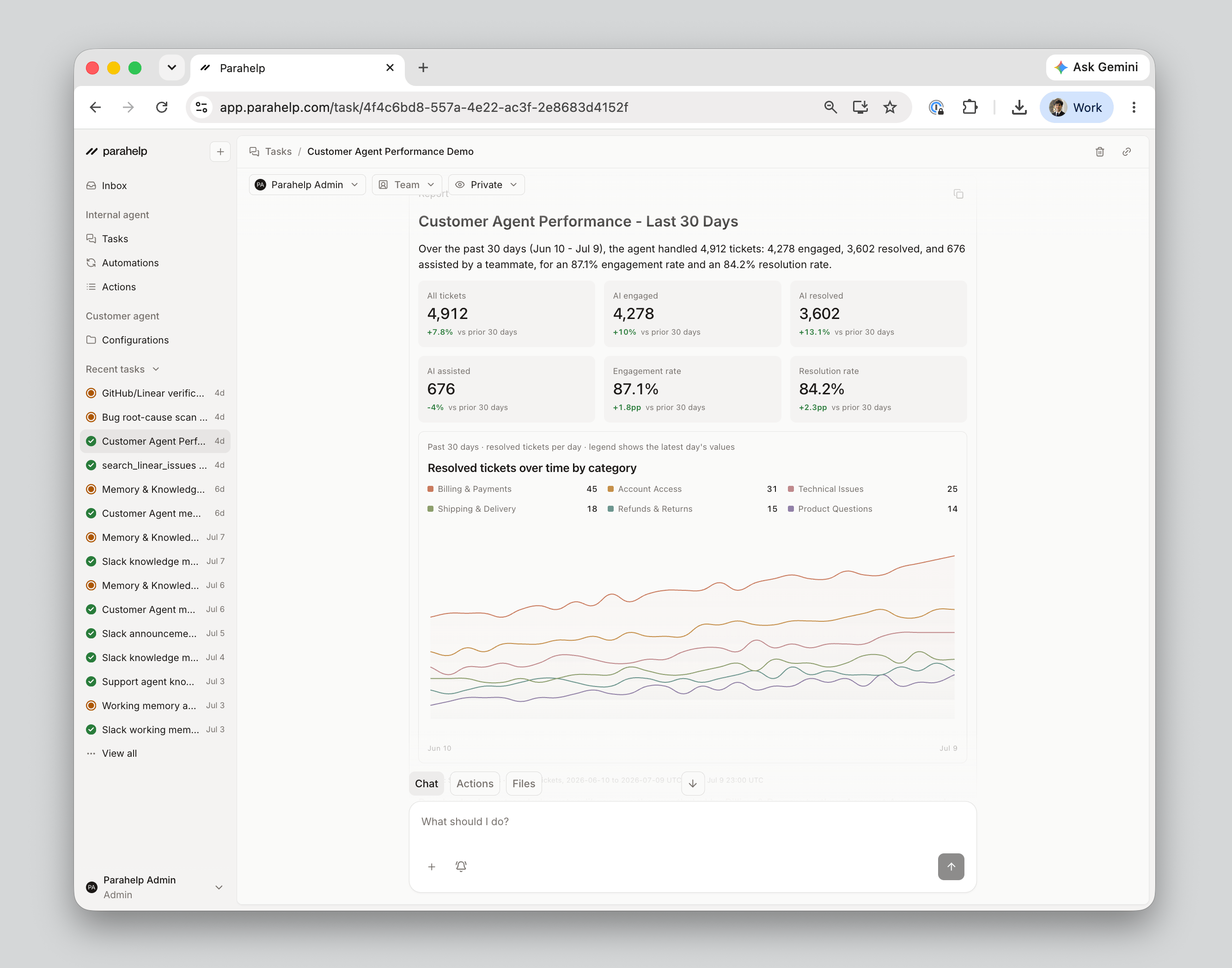
* **AI engaged:** Your Customer Agent replied to the ticket or took action on it.
* **AI resolved:** The agent closed the ticket, and it stayed closed for at least 3 days. Split into general, spam, and merged tickets.
* **Engaged, not resolved:** The agent engaged, then handed the ticket to a human for final resolution (previously called "assisted").
* **AI not engaged:** Your Customer Agent never worked the ticket.
* **Not routed to AI:** The ticket was never assigned to the agent, for example because your routing workflow excluded it.
* **AI ignored:** The ticket was assigned to the agent, but it stayed out, for example because the ticket type is out of scope in its instructions.
### Ask the Internal Agent
The Internal Agent covers both the numbers and the why - including the impact of every release on your resolution rate.
* **Quantitative reports.** *"Show me a graph of resolved tickets over the past month"* gets you an interactive chart, sortable by category. It can analyze any slice of your ticket data.
* **Qualitative reports.** Patterns, trends, and representative quotes across your tickets. Common ones: performance reports, bug-pattern reports, and improvement reports.
Run either on demand in a task, or daily and weekly as an automation (see [Automations](/platform/automations)).
 ### In your ticketing system
Your Customer Agent works as a team member in your ticketing system, so your existing reports track it automatically: SLAs, CSAT surveys, agent-level dashboards. We can also share report templates with the key metrics we recommend for every supported system.
***
Each proposal starts the next build. See [Build](/internal-agent/build).
### In your ticketing system
Your Customer Agent works as a team member in your ticketing system, so your existing reports track it automatically: SLAs, CSAT surveys, agent-level dashboards. We can also share report templates with the key metrics we recommend for every supported system.
***
Each proposal starts the next build. See [Build](/internal-agent/build).